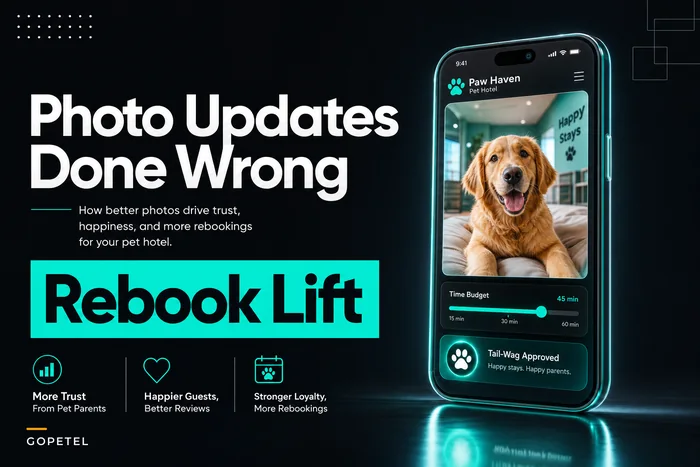



Most pet hotels that try video updates abandon them within a month. Not because owners don't love them — they love them, which is actually the problem. A 15-second clip of their dog shaking off bathwater gets a reply like "oh my god send more please!!!" and suddenly your kennel tech is filming a documentary instead of cleaning runs.
The failure isn't the idea. It's the lack of hard rules around capture length, batching, and throughput. Without caps, video updates quietly become the single most expensive thing your staff does per guest — and nobody notices until the holiday rush exposes it.
This is a system for keeping clips short, consistent, and gated so they drive rebooking without blowing up labor hours. If you've already set up a time-budgeted photo update plan, this is the video-specific companion — and video behaves very differently than photos operationally.
Why video quietly becomes a labor sinkhole
Photos are forgiving. A tech snaps three, picks the best one, done in under a minute. Video has four hidden cost multipliers that photos don't:
-
Filming time is real time. A 20-second clip requires at least 20 seconds of standing still, usually 40–60 because the dog does nothing interesting for the first half.
-
Retakes. Dogs look away, another dog barks, the shot is shaky. Expect 2–3 attempts per decent clip.
-
Review and selection. Someone watches the footage back to decide what's usable.
-
Editing creep. The moment one tech adds a trim or a caption, every client now expects that polish.
Add those up and a single "quick video" that feels like 20 seconds is realistically 3–5 minutes of staff time per guest. Multiply by 40 dogs on a busy weekend and you've burned two to three hours of labor on something nobody budgeted for.
The pattern across facilities is pretty consistent: video updates start as a nice touch, then silently cannibalize cleaning and feeding time until a manager kills the whole program. The clips were never the issue. The absence of any per-minute discipline was.
Treat video like a production line, not a gift
Facilities that make video work long-term stop thinking of it as a spontaneous gesture and start treating it like a batched task with fixed inputs and outputs. That means three non-negotiables:
Never miss a booking or detail again.
GoPetel simplifies pet hotel operations by managing every reservation and pet profile seamlessly.
- Centralized booking management
- Automated client notifications
- Staff and kennel scheduling
No credit card required
-
Capture templates so staff never improvise what to film.
-
Batching windows so filming happens in a dedicated block, not scattered all day.
-
Throughput caps so the program can't exceed its labor budget no matter how much clients ask.
Designate a single device or mount for capture during batching windows to keep framing consistent and reduce setup time.
This isn't about making the experience feel robotic — guests never see the system. They just see a consistent, well-timed clip of their dog looking happy.
Quick visual of the capture-to-send workflow.
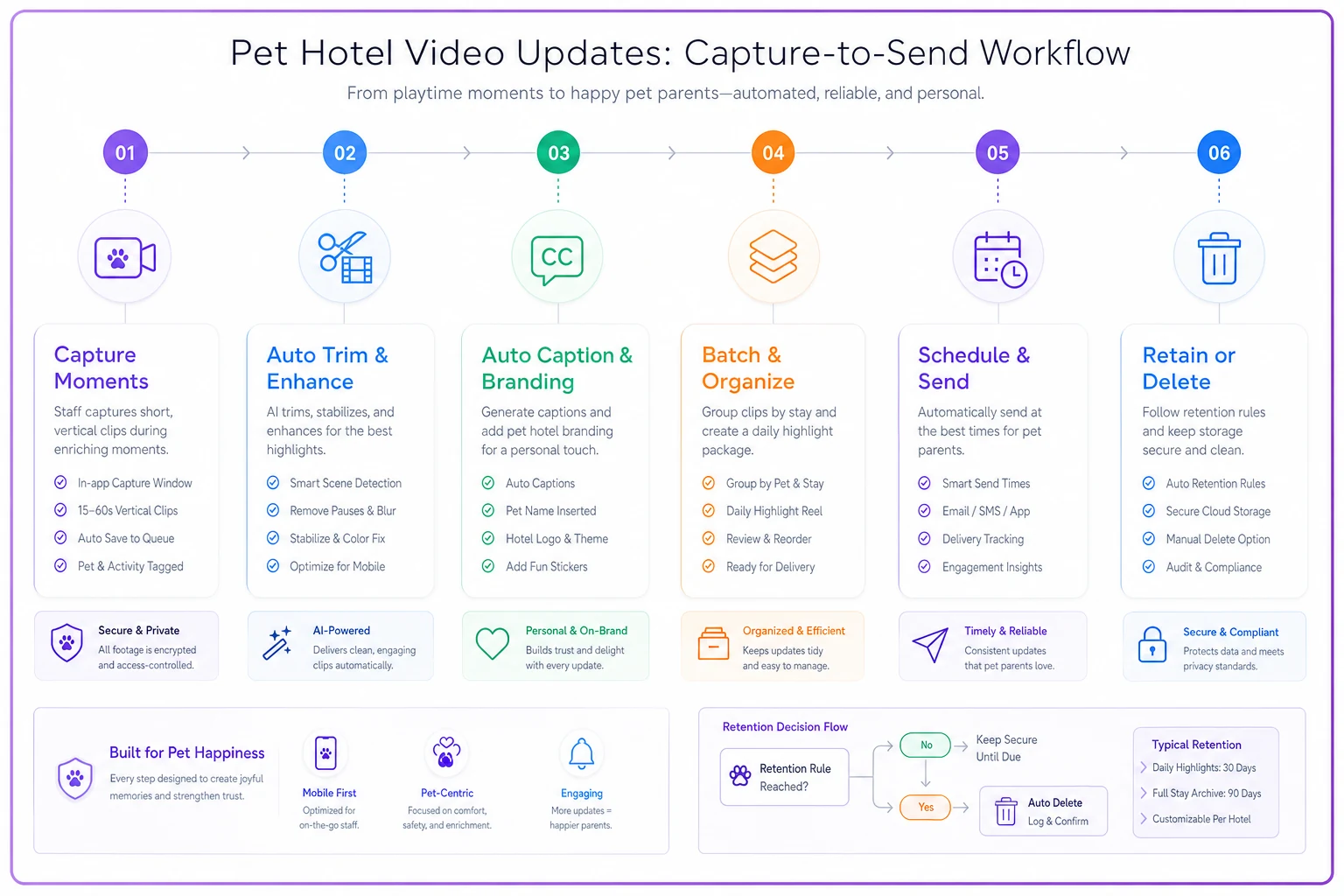
The graphic above shows the flow from capture through automated post-processing to delivery and retention.
Capture templates: 10–30 second clips with a fixed shot list
The single biggest time-saver is removing the decision of what to film. When a tech has to think "what's a good shot of this dog," they waste time and produce inconsistent results. Give them 4–5 pre-defined clip types and the filming becomes almost mechanical.
Here's a working template set. Each clip type has a target length and a hard stop.
| Clip type | Target length | What's filmed | When to use it |
|---|---|---|---|
| Mealtime | 10–15s | Dog eating or finishing a bowl | Day 1, reassures anxious owners |
| Yard/play | 15–25s | Running, sniffing, playing with a toy | Mid-stay, highest emotional payoff |
| Calm/rest | 10–15s | Dog relaxed in run or on a bed | For reactive or senior dogs |
| Enrichment | 15–20s | Puzzle feeder, lick mat, one-on-one time | Premium package guests |
| "Goodnight" | 10s | Settled at end of day | Night-check add-on |
The hard length cap matters more than it looks. A 30-second ceiling does two things: it keeps file sizes manageable and it forces the tech to stop. Without a ceiling, clips drift to 60–90 seconds, which quadruples review and send time and sets an expectation you can't sustain.
One pattern worth borrowing: tell staff to film horizontally, one take, no retakes under 10 seconds in. If the first 10 seconds are usable, it ships. Chasing the perfect clip is where the minutes die.
Batching rules: one filming window, not all-day capture
Scattered filming is the enemy. When techs film "whenever they get a cute moment," they context-switch constantly — put down the hose, grab the phone, film, put the phone away, pick the hose back up. Each switch costs 30–60 seconds of ramp time, and that adds up fast across a full shift.
-
Morning window (during yard rotation)
yard/play and mealtime clips.
-
Evening window (during night settle)
calm/rest and goodnight clips.
During those windows, one tech films a batch of dogs back-to-back. Filming 12 dogs in a focused 20-minute block is dramatically cheaper per clip than 12 interruptions scattered across an 8-hour shift.
-
Auto-trim to the first 10–30 seconds.
-
Apply a standard caption overlay with the dog's name, pulled from the booking record.
-
Compress to a send-friendly size.
-
Queue for a single batched send at a fixed time — say, 11am and 7pm.
A staff member's only job is to point and shoot within the window. Everything after capture — trimming, labeling, delivering — runs on rails. The moment editing becomes a manual judgment call, your per-clip cost doubles and consistency falls apart.
Throughput caps: the rule that saves your program
Almost everyone skips this part. It's also the most important. You need a hard ceiling on clips per staff-hour, and the program has to hold to it.
A practical starting point:
-
Max 1 clip per guest per day on standard packages.
-
Max 2 clips per guest per day on premium.
-
Total facility cap of roughly 1 clip per 90 seconds of allocated capture labor.
If you allocate 40 minutes of capture labor a day, your ceiling is around 25–26 clips total. The system distributes those by package tier and priority — not by whoever asks loudest.
Without a cap, a handful of enthusiastic clients will quietly consume a disproportionate share of labor. Three repeat clients absorbing nearly a third of all video output because front desk kept saying yes to "just one more" — that's not hypothetical, that's a pattern that shows up regularly across boarding operations. A cap turns video from an open-ended favor into a defined service level, which is a much easier thing to staff against.
Consent and gating language (don't skip this)
Video of animals is low-risk, but video that accidentally captures other clients' pets, staff faces, or facility layout is a different story. A few lines in your intake waiver cover most of it.
> "I authorize [Facility] to capture and share short video updates of my pet during their stay, sent directly to me via SMS/email. I understand other animals or staff may incidentally appear. These videos are for my personal use and may be used by [Facility] for marketing only with my separate written consent (checkbox below)."
-
Private delivery consent (opt-in to receive updates at all).
-
Marketing/social use consent (a distinct, optional checkbox).
Keep these separate. Bundling them is the mistake — a client happy to receive a clip of their dog may be very unhappy seeing it on your Instagram. Gate those as two different permissions.
A quick checklist for consent hygiene:
-
- [ ] Delivery consent captured at booking, not at the kennel
-
- [ ] Separate marketing-use checkbox, unchecked by default
-
- [ ] Note any "do not film" flags on the guest record
-
- [ ] Framing rule
film the guest dog only, avoid other runs in shot
-
- [ ] Easy opt-out in every message ("reply STOP to pause updates")
Keep these separate. Bundling them is the mistake — a client happy to receive a clip of their dog may be very unhappy seeing it on your Instagram. Gate those as two different permissions.
Retention: don't keep video forever
Pet video piles up fast, and storage plus liability both grow with it. Set a retention policy and automate deletion:
-
Client-delivered clips auto-delete from your systems 7–14 days after the stay ends. The client already has their copy.
-
Marketing-approved clips move to a separate, consented library; keep as long as consent stands.
-
Incident-adjacent footage (anything near a scuffle or injury)
follow your incident-retention rules, not your video rules.
The common mistake is treating all footage the same and either hoarding everything — storage cost, privacy exposure — or deleting everything and losing a usable marketing library. Split it by consent status at the point of capture and let retention run automatically. That way nobody has to make a judgment call about which folder a clip lives in two months after the stay.
Per-minute ROI: making the case this is worth it
Here's the honest math, because video only survives if it pays for itself in rebooking.
Say a clip costs roughly 2.5 minutes of blended staff time at about $18/hour fully loaded — that's around $0.75 per clip. At 25 clips a day, that's under $20/day, or somewhere in the $500–$600/month range in labor. On the return side, video updates tend to move rebooking at the margin — anxious first-time clients especially. If video nudges even 2–3 additional rebookings a month on stays averaging around $240, that's $480–$720 recovered against a ~$550 cost. It roughly washes at worst and clears a modest profit at best — as long as the throughput cap holds. Blow the cap and labor triples while rebookings stay flat, and the math falls apart quickly.
This connects directly to how you measure guest experience overall. If you're already running stay audits that map experience to repeat revenue, video response rate and rebooking lift are two clean metrics to fold into that same review cycle.
A quick real scenario
A mid-size boarding facility — about 55 runs, two kennel techs per shift — rolled out video with no caps. Within three weeks, techs were spending close to two hours a day filming and re-filming, cleaning times were slipping, and one tech flat-out refused to do videos anymore.
They reset with the rules above: one 20-minute morning capture window, a 30-second hard trim, auto-captioning off the booking record, and a cap of one clip per standard guest. Capture labor dropped to roughly 35–40 minutes a day. Clip output actually went up because filming got mechanical instead of precious.
Rebooking among first-time clients improved by a few points over the following quarter — not a dramatic spike, just a steady, measurable lift that more than covered the labor. The lesson wasn't "do more video." It was "cap the video so the good version is actually sustainable."
When this makes sense — and when it doesn't
Do this if:
-
You have a repeatable daily routine you can attach capture windows to.
-
First-time and anxious-owner clients are a meaningful share of bookings.
-
You can enforce caps and front desk won't quietly override them.
Skip or delay this if:
-
You're chronically short-staffed and even 35 minutes/day is unrealistic right now.
-
Your intake waivers don't yet cover media consent — fix that first.
-
You can't resist turning every clip into a polished edit. Half-committing to video is worse than not doing it, because you create an expectation you can't scale.
Who should not run this: any facility still firefighting cleaning turnaround or check-in bottlenecks. Video is a delighter layered on top of solid operations. If the foundation is shaky, video just adds load to an already-stressed shift.
The takeaway
Video updates fail at pet hotels for one reason: nobody puts a ceiling on them. Short templated clips, a single batching window, auto-edit rules that keep humans out of post-production, and a firm throughput cap turn an unscalable favor into a service you can actually run every day.
Keep the clips short, keep the consent clean, delete footage on schedule, and watch the per-minute cost. Do that, and video stays a quiet rebooking driver instead of the thing your staff dreads every morning.
Keep the clips short, keep the consent clean, delete footage on schedule, and watch the per-minute cost. Do that, and video stays a quiet rebooking driver instead of the thing your staff dreads every morning.
Ready to optimize your pet hotel operations?
Join hundreds of pet hotels using GoPetel to save time, improve pet care, and increase booking reliability.