
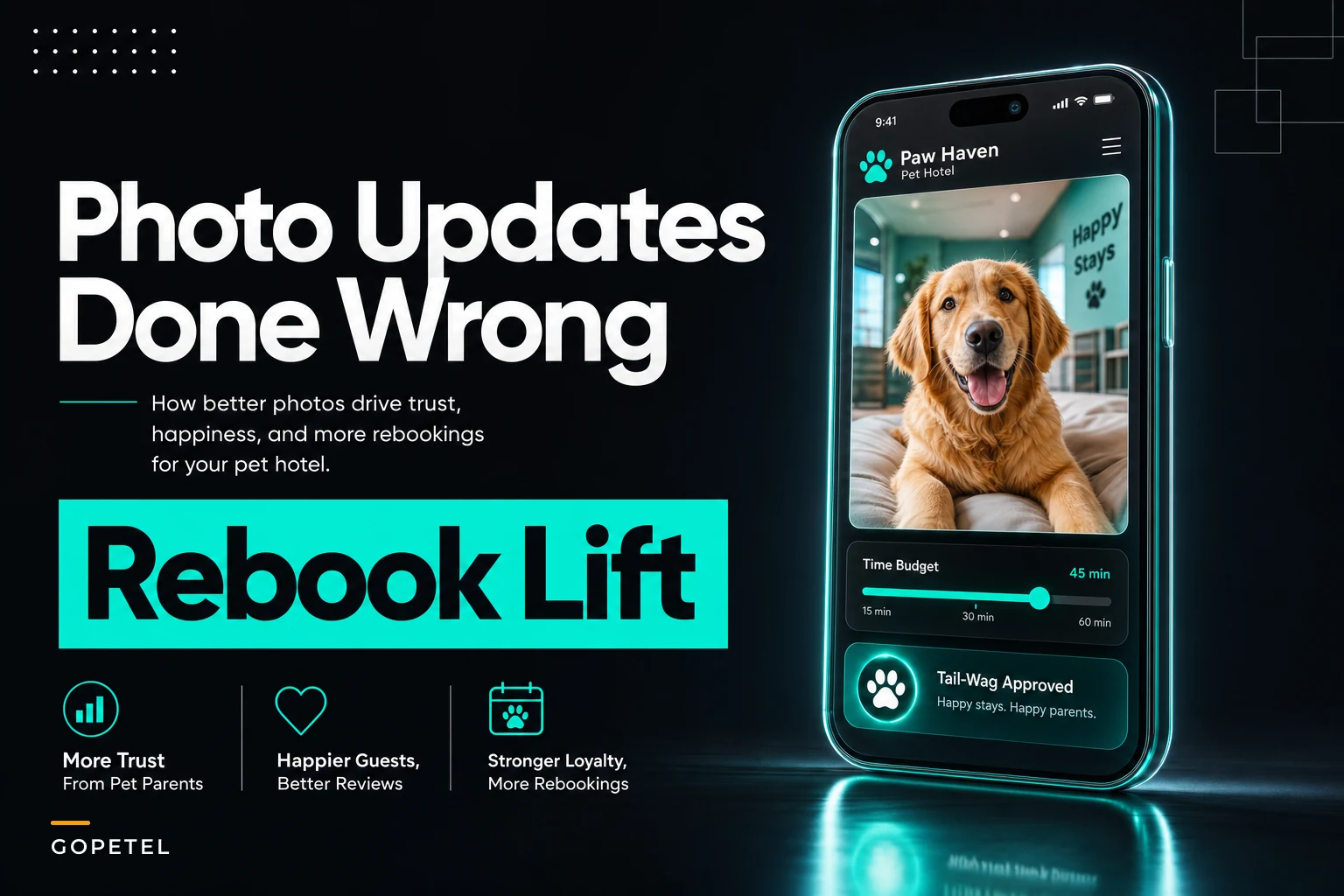

Pet hotel photo updates feel simple enough. Snap a photo, send it to the owner, make them happy. But when you break down what doing this wrong—or inconsistently—actually costs, the numbers get uncomfortable fast.
Most pet hotels treat photo updates like a nice-to-have. Staff grab photos when they remember, sometimes send them, sometimes don't. Nobody tracks whether those photos drive rebookings. Meanwhile, between taking the photo, uploading it, writing a message, and sending it through whatever platform you're using, you're burning somewhere around 12–15 minutes per update.
The part that quietly kills profitability: a 40-kennel facility doing sporadic photo updates might spend 8–10 hours weekly on this with zero measurable return. That's real labor cost—roughly $160–200 a week—for something nobody's actually tracking.
The facilities getting this right have flipped the approach entirely. They budget time for updates, test different frequencies against rebooking rates, and know what their return per staff minute actually looks like. One operation I've seen move from random updates to scheduled twice-weekly ones saw their rebooking rate climb noticeably—not because the photos got better, but because the process finally had structure.
Why most photo update programs fail before they start
There are three operational reasons photo update programs fall apart, and none of them have to do with photo quality.
First, there's no consent system. Staff waste time figuring out which owners want updates, how often, and through which channel. Some owners get bombarded. Others complain they never received anything. Without clear documentation, you're also walking into privacy problems the moment someone posts a pet photo on your facility's Instagram without explicit permission.
Second, the time cost spirals because there's no defined process. Watch your staff do photo updates sometime and you'll see what fragmented operations actually look like. Five minutes trying to get a decent shot of a nervous dog. Three minutes tracking down the owner's contact info. Another couple minutes writing something that sounds personal. Multiply that across 25–30 dogs and you've consumed most of a shift.
Third—and this one gets overlooked—facilities treat every update the same. Sending the same frequency to a first-time boarder as a monthly regular makes no operational sense. New customers need more touchpoints to build trust. Regulars already trust you, and more updates don't add much for them. They can actually start to feel like noise.
If someone asked you right now how many minutes you spend per update on average, could you answer? If not, you can't optimize it.
Building an opt-in consent matrix that actually works
The consent system needs to capture four things most facilities never ask about.
Never miss a booking or detail again.
GoPetel simplifies pet hotel operations by managing every reservation and pet profile seamlessly.
- Centralized booking management
- Automated client notifications
- Staff and kennel scheduling
No credit card required
Start with update frequency preference. Don't just ask yes or no—give owners real options: daily updates (first-timers and anxious owners), every-other-day (the middle ground that works for most), or milestone-only (arrival and departure confirmation for regulars who don't need more). Segmenting like this alone cuts photo workload significantly while actually improving how owners feel about the service.
Next, pin down the communication channel. Email, text, or in-app messaging. Sounds obvious, but when staff know exactly where to send updates, you eliminate the back-and-forth that bleeds time. Switching primarily to batch email sends saved one facility I worked with a few minutes per update compared to individual texts—which adds up fast.
Third, get explicit social media consent. Three tiers work well: no posting, okay to post without the pet's name, okay to post with name and owner tag. This prevents the awkward situation where an owner recognizes their dog on your Instagram and you never asked them.
Fourth—the thing most intake forms skip entirely—capture special requests upfront. Some owners want feeding confirmation. Some want to see their dog playing with others. Getting this at check-in means staff aren't guessing what to photograph each day.
A simple structure that actually gets used at intake:
-
Photo Update Preferences
-
- Frequency
☐ Daily ☐ Every other day ☐ Arrival/departure only
-
- Channel
☐ Email ☐ Text ☐ App notification
-
- Social media
☐ No posting ☐ Anonymous okay ☐ Full tags okay
-
- Special requests
_
Build this into the check-in conversation, not as a separate form. It takes 30 seconds and saves hours of confusion downstream.
Have staff confirm the selected frequency aloud during check-in and mark it in the system to avoid downstream confusion.
Build this into the check-in conversation, not as a separate form. It takes 30 seconds and saves hours of confusion downstream.
The time budget formula that changes everything
A single photo update typically breaks down like this:
-
- Photo capture
2–3 minutes (including retakes)
-
- Upload/transfer
1 minute
-
- Message writing
2–3 minutes
-
- Sending
1 minute
-
- Responding to replies
2–3 minutes on average
Total: 8–12 minutes per update.
For a 40-kennel facility at 70% occupancy where half the owners want daily updates, that's around 14 updates a day. At 10 minutes each, you're looking at over two hours daily just on photos.
The budget approach flips this. Instead of open-ended time per update, you set hard limits:
-
- 3 minutes maximum for photo capture
-
- Pre-written templates customized in 30 seconds
-
- Batch sends at scheduled times (eliminates individual sending entirely)
-
- No real-time responses during peak operations
That brings time per update down to roughly 4 minutes. Same 14 daily updates now take under an hour instead of more than two. That's a meaningful chunk of productive staff time recovered every single day.
You wouldn't let staff spend unlimited time on feeding rounds. Why allow it for photos?
Message templates that drive rebookings without sounding robotic
The biggest time drain in photo updates isn't actually the photos—it's writing messages. Staff either spend too long trying to sound personal or send something so generic it feels automated. Neither works.
Five templates cover roughly 90% of situations:
First day update: "[Pet name] settled in great! Already made friends with [specific detail]. Eating well and enjoying [specific activity]."
Routine update: "[Pet name] had another great day! Highlights included [activity 1] and [activity 2]. Energy level is [observation]."
Special service update: "[Pet name] loved their [service] today! [Specific observation about their reaction]. They're now [current activity]."
Social update: "[Pet name] is having a blast with their buddy [other pet name]! They've been [specific play behavior]. So fun to watch!"
Pre-pickup update: "[Pet name] has been wonderful! Can't wait to see you at pickup. They'll be ready after their [final service/activity]."
The key is training staff to fill bracketed sections with actual observations—not generic filler. "Playing with toys" becomes "obsessed with the squeaky giraffe." "Eating well" becomes "finished breakfast in record time." That specificity is what makes updates feel personal even when the structure is identical every time.
This cuts message writing from 3 minutes to about 30 seconds.
Testing update frequency against rebooking rates
This is where most pet hotels leave real money on the table—they never test whether photo updates actually drive rebookings. You're spending hours on this with zero data on whether it's working.
A basic test over 60 days:
-
Group A gets updates every visit
-
Group B gets updates only on request
-
Track 90-day rebooking rates for both groups
One facility that ran something similar saw a meaningful gap between the two groups—roughly 10–15 percentage points in rebooking rates, depending on the customer segment. The additional retained revenue made the labor cost easy to justify.
The more interesting finding: within the update group, daily updates actually performed worse than every-other-day for rebooking overall—though daily did better specifically for first-time boarders. That nuance only shows up when you actually track it.
A frequency pattern that tends to hold up:
-
- First-time customers
Daily updates for first stay
-
- Returning customers (2–5 stays)
Every other day
-
- Regular customers (6+ stays)
Twice weekly
-
- Monthly boarders
Weekly unless they ask for more
Facilities that go through this process almost always find they can cut total update hours significantly while rebooking rates stay flat or improve.
ROI model: staff minutes versus retention revenue
Most pet hotels can't answer what their actual return on photo update labor is. A simplified model makes it visible.
Input costs:
-
- Average staff wage
$15/hour ($0.25/minute)
-
- Minutes per update
4 (optimized process)
-
- Updates per week
85 (40-kennel facility estimate)
-
- Weekly labor cost
340 minutes × $0.25 = $85
Revenue impact:
-
- Average boarding value
$45/night
-
- Average stay length
3 nights
-
- Per-booking value
$135
-
- Additional monthly bookings from updates
variable, but even a modest lift in rebooking rate adds up quickly at $135/booking
Simple ROI calculation:
-
- Monthly labor cost
~$365
-
- Monthly benefit (assuming a 15–18% rebooking lift)
easily $2,000+
-
- ROI
well above 5x on labor alone
The model gets more interesting when you factor in higher customer lifetime value, reduced acquisition cost from word-of-mouth, and lower price sensitivity among engaged customers.
Even conservative math shows that photo updates done right generate strong returns. The catch—and it's a real one—is that without time budgets and process, you're probably running negative ROI and not even knowing it.
Measuring and optimizing the permission-to-conversion pipeline
Four metrics tell you whether your program is actually working:
Opt-in rate: What percentage of customers accept photo updates? Below 60% means your pitch needs work. Above 85% might mean you're not setting expectations clearly enough—which usually creates disappointment later.
Execution rate: Of customers who opt in, what percentage actually receive updates? This surfaces operational gaps fast. If 30% of promised updates aren't happening, you're actively eroding trust.
Engagement rate: Of updates sent, what percentage get a response? Below 25% usually means updates are too generic. Above 50% might mean you're accidentally creating more back-and-forth than your staff can handle.
Rebooking correlation: Compare 60-day rebooking rates between customers who respond to updates versus those who don't. Engaged customers should rebook noticeably more often. If not, the updates aren't creating enough value.
A simple weekly tracking sheet:
| Week | Opt-ins | Updates Sent | Responses | Rebookings from Updated | Rebookings from Non-updated |
|---|---|---|---|---|---|
| 1 | 23 | 19 | 12 | 8 | 4 |
| 2 | 28 | 26 | 14 | 11 | 5 |
| 3 | 21 | 18 | 9 | 7 | 3 |
This shows pretty quickly whether the program is earning its labor hours or not.
Red flags that your update program is destroying margin
Watch for these warning signs.
Staff consistently spending over 5 minutes per update. This almost always means no templates, no process, or someone treating every message like a creative writing exercise.
Updates sent at random times throughout the day. This wrecks productivity. Staff context-switch constantly between operations and photos. Batching at fixed times—11am and 4pm work for most facilities—keeps workflow intact.
More than 20% of updates generating extended conversations. Engagement is good. Long back-and-forth threads are a customer service problem in disguise. Staff should acknowledge responses and redirect detailed questions to the front desk.
No measurable correlation between updates and rebooking. If updated customers don't rebook more often, you're paying for free entertainment with no business benefit.
Using personal phones for photo updates. This creates storage issues, privacy exposure, inconsistent quality, and the uncomfortable situation of staff leaving with customer contact info on their personal devices. Invest in a dedicated device or use your management platform's photo feature.
Small facility workarounds when you can't dedicate photo staff
Smaller facilities can't assign someone purely to this task. A few approaches that actually work in practice:
The rotating slot model: Assign photo updates to whoever's working specific time blocks—mid-morning, early afternoon, evening. That person handles all updates for their window. Prevents the "someone else will get to it" problem without creating a dedicated role.
Feeding round integration: Capture photos during feeding rounds when you're already interacting with each animal. Adds maybe 30 seconds per kennel but eliminates a separate photo circuit entirely.
Zone batching: Divide the facility into sections and rotate which zones get photographed on which days. Every pet gets covered a couple times a week without overwhelming any single shift.
Owner video calls: For longer stays, invite owners to schedule a short video call during quiet hours. Takes 5 minutes, creates a lot of goodwill, requires zero editing or message writing. Works particularly well for anxious first-time boarders who'd otherwise text for updates anyway.
Integrating updates into existing workflows
The biggest mistake is treating photo updates as an add-on. They need to flow inside existing operations.
During morning health checks, identify which pets need updates that day based on your frequency preferences. A colored clip on the kennel door—green for needed, red for completed—is low-tech and works better than trying to remember or reference a list mid-shift.
Build photo updates into your existing check-in workflows. When confirming preferences at check-in, show owners what frequency they selected. This alone prevents the "I thought I was getting daily photos" complaint that's entirely avoidable.
Connect updates to your pricing and packaging structure. Premium packages include daily updates. Standard packages get every-other-day. Basic packages are milestone-only. That turns photo updates from a cost center into a feature with a price attached.
Use quiet periods intentionally. The mid-afternoon lull when most dogs are napping is the right time for batch uploading and sending—not when operations are running at full speed.
Make photo updates part of onboarding new staff from day one. When it's learned alongside feeding and cleaning protocols, it never becomes an afterthought.
When photo updates make sense (and when they don't)
Not every pet hotel should run an extensive program here.
Photo updates make sense when:
-
- Average stay exceeds 3 nights (shorter stays don't generate enough ROI to justify the process)
-
- Staffing is consistent enough to actually execute
-
- Your clientele skews toward engaged, higher-value pet owners
-
- You're competing on experience rather than price
-
- Rebooking rate is below 60%
Skip it or scale way back if:
-
- You're consistently above 90% capacity (focus on operations)
-
- Average stay is under 2 nights (daycare model)
-
- You're in a price-sensitive market where owners won't pay premiums
-
- Staff turnover is high enough that training gets reset constantly
-
- Basic operations aren't stable yet
One facility made the mistake of launching an ambitious photo update program while still struggling with basic scheduling. The added complexity created problems on top of existing ones. They pulled back, fixed fundamentals over the following months, and reintroduced updates slowly. That's the right sequence. Not glamorous advice, but accurate.
Building your implementation roadmap
Don't try to launch a full program overnight. Phase it in over about 8 weeks.
-
Weeks 1–2
Baseline measurement.
Track current time spent on ad-hoc updates. Document rebooking rates. You need this baseline to prove ROI later. -
Weeks 3–4
Build infrastructure.
Create consent forms, message templates, and time budgets. Train staff before volume increases. Get everyone comfortable with the process in a low-pressure environment. -
Weeks 5–6
Pilot program.
Run with new customers only. Smaller group, easier to catch problems without overwhelming the operation. Refine templates based on what actually happens in the field. -
Weeks 7–8
Full launch with tracking.
Expand to all opted-in customers. Start measuring consistently. Compare rebooking rates between updated and non-updated customers. -
Week 9+
Optimization.
Use data to adjust frequency, timing, and templates. If updates still aren't moving the needle on rebooking, fix the process or cut the program. No point running something that doesn't pay for itself.
Starting with a two-week baseline phase might feel slow, but the facilities that skip it almost always end up arguing about whether the program is working with no data to settle the question.
Here's a simple roadmap visualization.
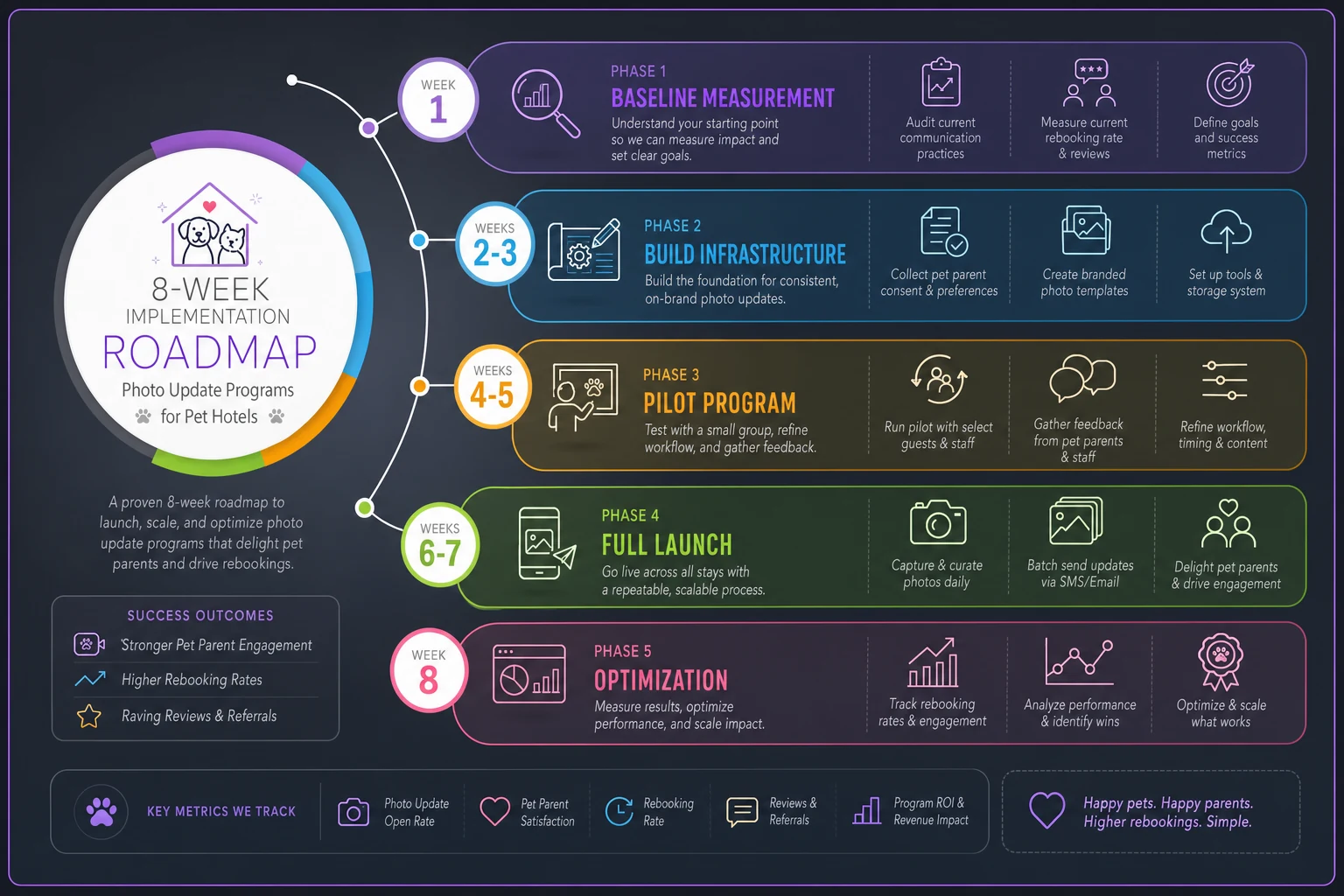
Starting with a two-week baseline phase might feel slow, but the facilities that skip it almost always end up arguing about whether the program is working with no data to settle the question.
The software piece that actually matters
The right operational platform can meaningfully cut photo update time while improving consistency. Instead of personal phones, multiple messaging apps, and manual tracking, everything runs through one system.
AI-powered automation handles the mechanical parts—resizing photos, applying watermarks, selecting appropriate templates based on stay type, scheduling batch sends. Staff capture the photos and add specific observations. The platform handles distribution, tracking, and can surface patterns in engagement and rebooking data over time.
More importantly, integrated software connects photo updates to broader retention patterns. The system knows when a customer's last stay was, their update preferences, and whether they tend to rebook—and can help staff prioritize the right touchpoints for the right customers instead of treating everyone the same.
It doesn't replace the human element. It removes the mechanical overhead so staff can spend that recaptured time on moments that actually create connection.
Making the model work for your specific situation
Every pet hotel has different dynamics. A luxury facility in a dense urban market operates very differently from a rural boarding kennel.
If your labor costs are higher, you need a stronger return to justify the program. That might mean charging for photo updates as a service add-on. Some facilities charge $3–5 per day and have most customers paying it without much friction.
If your market is competitive, photo updates might be table stakes rather than a differentiator. In that case, optimize for execution consistency rather than frequency. Twice-weekly updates delivered reliably outperform daily updates you can't actually staff.
Demographics matter too. Younger millennial owners often expect updates as standard. Older customers might find frequent updates unnecessary or even a bit much. Know your clientele.
Seasonality matters as well. During peak holiday periods, scaling back to arrival and departure photos only is a reasonable operational call. During slower seasons, increasing frequency makes sense when you have the bandwidth.
Track what works for your specific facility. Industry benchmarks are a starting point, not a target.
The bottom line on photo updates
Photo updates aren't just about making pet parents feel good—though that matters. When structured with time budgets, templates, and actual ROI tracking, they become a retention system with real measurable returns.
The facilities doing this well don't treat updates as random gestures of customer service. They've built processes with clear consent flows, defined time investments, and direct measurement against rebooking rates.
If you're spending more than 4–5 minutes per update, the process is broken. If you can't point to a rebooking lift from updates, you're guessing. If staff are writing individual messages from scratch for every photo, you're burning money on goodwill that probably isn't converting to retained revenue.
Fix the process first. Set time budgets. Build templates. Test frequency against rebooking. Track actual ROI. Then scale.
Most pet hotels lose money on photo updates because they treat them like a social media strategy instead of an operational system. The ones making money treat updates like any other business process—measured, optimized, and tied directly to revenue. Stop guessing whether photo updates work, build the system, run the numbers, and find out for certain.
Ready to optimize your pet hotel operations?
Join hundreds of pet hotels using GoPetel to save time, improve pet care, and increase booking reliability.