

Every Monday morning, pet hotel operators open six different browser tabs to pull weekend numbers. Export from Gingr. Download from Square. Copy from your scheduling app. Paste into Google Sheets. Fix the formulas that broke. Email the report.
By Wednesday, the data's already stale.
I watched a facility in Austin lose around $4,200 in missed upsells because their weekend occupancy reports weren't compiled until Tuesday afternoon. The patterns were obvious—Sunday pickup families were perfect grooming candidates—but by the time anyone looked at the numbers, those clients had already driven home.
This isn't about dashboards or fancy analytics. It's about basic operational visibility. The kind that determines whether you catch a problem at 20% impact or 80% damage.
The hidden cost of manual data workflows
Most operators assume manual exports waste maybe an hour a week. The real damage is in the decision delays.
-
Booking platform (reservations, occupancy, client details)
-
Point-of-sale (transactions, payments, refunds)
-
Scheduling software (staff hours, shift coverage)
-
Payment processor (settlement reports, chargebacks)
-
Email marketing tool (campaign performance, open rates)
-
Review platforms (ratings, feedback trends)
Each export takes 5–15 minutes. Each reconciliation adds another 10. Each broken formula eats 20 minutes of troubleshooting. But the part that actually hurts operations is this: the facility sees Monday's no-show pattern on Thursday. A grooming bottleneck that started building Tuesday gets discovered the following week. A payment processing fee spike from a new card type goes unnoticed for a month.
When you're running 70% occupancy with eight staff members, these delays compound. A staffing inefficiency that costs $50 a day becomes $1,500 monthly before anyone spots the trend.
Why traditional integrations fail pet hotels
Generic integration tools assume clean data structures and consistent APIs. Pet hotel systems are messier.
Never miss a booking or detail again.
GoPetel simplifies pet hotel operations by managing every reservation and pet profile seamlessly.
- Centralized booking management
- Automated client notifications
- Staff and kennel scheduling
No credit card required
Gingr uses different field names than PetExec. Kennel Booker stores vaccination dates differently than ProPet. Your POS might track services as line items while your booking system uses service codes.
-
Booking data syncs but not customer notes
-
Payment totals transfer but not itemized services
-
Occupancy numbers import but not kennel-specific assignments
-
New bookings flow through but modifications don't update
The technical term is "partial integration hell." You get just enough automation to trust the system, but not enough to actually rely on it.
The low-code approach that actually works
Instead of forcing complex integrations, build simple data pipelines that match how your business actually operates.
Core principle: Every critical metric gets one source of truth and one update method.
Start with three essential pipelines:
Pipeline 1: Daily Occupancy Flow
Source: Booking system Destination: Google Sheets Frequency: 6 AM daily Fields: Date, total occupancy, kennel type breakdown, daycare count
Use a tool like Zapier or Make to:
-
Trigger at 6 AM
-
Query yesterday's final occupancy
-
Append to running spreadsheet
-
Calculate 7-day rolling average
-
Flag if occupancy drops below 60%
This gives you trend visibility without manual pulls. Add a simple formula to project next week based on current bookings versus historical patterns.
Pipeline 2: Payment Reconciliation
Source: POS + Payment processor Destination: Accounting sheet Frequency: End of day Fields: Daily total, payment types, refunds, outstanding balances
The trick here is matching timing. Your POS closes at 6 PM but your payment processor batches at midnight. Build in a 12-hour delay so the numbers actually match.
Set up exception reporting for:
-
Refunds over $100
-
Declined payments from regular clients
-
Processing fees above 3%
-
Daily totals varying more than 20% from average
Pipeline 3: Service Utilization Tracking
Source: Booking system Destination: Performance dashboard Frequency: Weekly Fields: Service type, count, revenue, attach rate
Most operators track boarding nights but miss service attachment patterns. Your data probably shows things like:
-
40% of 3+ night stays book grooming
-
25% of daycare dogs eventually board
-
15% of new clients upgrade packages within 60 days
Without automated tracking, these insights stay buried in export files nobody opens twice.
Visualize the pipeline to understand where failures can happen and what steps trigger alerts.
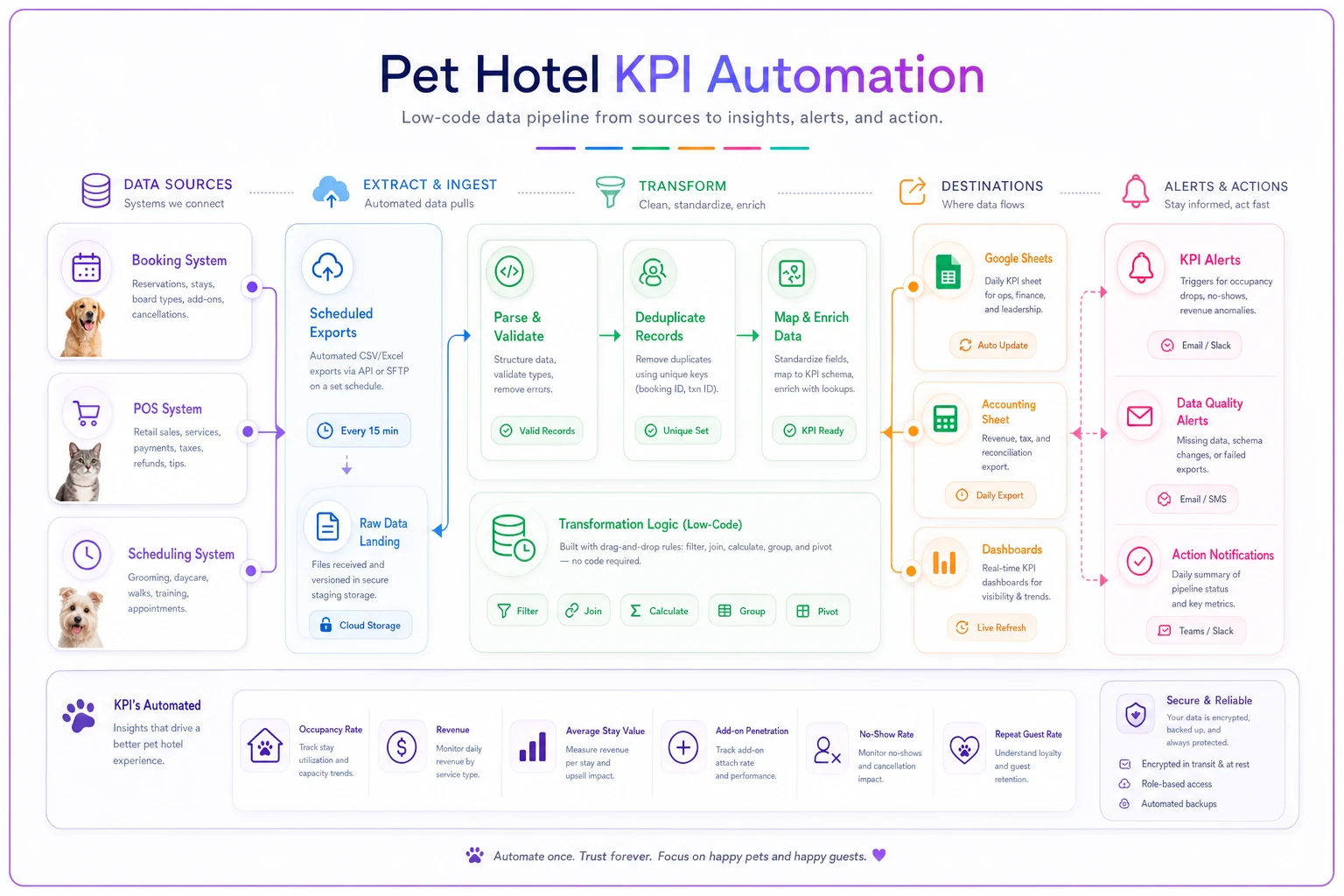
The diagram above maps source → transform → destination steps so you can assign ownership and failure checks at each handoff.
Building alerts that prevent operational surprises
Data pipelines without alerts are just automated reports nobody reads. The value comes from exception-based notifications.
Configure alerts for operational thresholds:
Occupancy Alerts
-
Tomorrow's occupancy below 40% → Review marketing push
-
Weekend occupancy below 65% (by Wednesday) → Activate promotion
-
Next week tracking 20% below same week last year → Investigate
Financial Alerts
-
Daily revenue 30% below average → Check for system issues
-
Refunds exceed 5% of daily revenue → Review service problems
-
Payment failures from top 10 clients → Personal follow-up
Operational Alerts
-
Grooming attachment rate drops below 20% → Staff training needed
-
New client retention below 40% at 30 days → Onboarding review
-
Average length of stay decreasing → Pricing or service issue
These aren't vanity metrics. They're early warning systems for revenue leaks.
Common pet hotel data stacks and their quirks
Different booking platforms require different approaches:
| Platform | Integration Approach | Key Quirk |
|---|---|---|
| Gingr | Scheduled exports → Zapier → Sheets | Timezone handling shifts overnight bookings |
| PetExec | Modular API pulls per module | Data fragmented across reservations, services, payments, clients |
| ProPet | Appointment + invoice exports | Boarding data buried under veterinary features |
| Kennel Booker | Nightly batch exports + RPA tools | Poor native automation; needs custom scripts to clean data |
Gingr-based operations
Gingr's API is limited but their export function is comprehensive. Build daily exports via their scheduled reports, then use Zapier to email the report to a dedicated inbox, parse the CSV attachment, push to Google Sheets, and transform data for consistency.
Main gotcha: Gingr's timezone handling can shift overnight bookings. Always use check-in date, not reservation date.
PetExec workflows
PetExec offers better API access but fragments data across modules. You'll need separate pulls for reservations, services, payments, and customer data. Build modular pipelines for each, then combine in a master sheet. Their webhook support means you can get near-real-time updates for critical events.
ProPet configurations
ProPet prioritizes veterinary features, which makes boarding data extraction trickier. Focus on appointment exports, invoice reports, and client activity logs. A lot of ProPet users end up building a parallel tracking system in Sheets that becomes the real operational dashboard. Not ideal, but it works.
Kennel Booker setups
Kennel Booker has solid reporting but poor automation options. Most successful implementations use nightly batch exports via their scheduler, RPA tools to log in and download reports, and custom scripts to clean and transform data.
The 30-day implementation roadmap
Week 1: Foundation
-
Map current data sources
-
Document export procedures
-
Identify top 3 KPIs needing automation
-
Set up Google Sheets structure
-
Choose integration platform (Zapier/Make/n8n)
Week 2: First Pipeline
-
Build occupancy tracking pipeline
-
Test data accuracy for 5 days
-
Create basic dashboard view
-
Set up one critical alert
-
Document any data issues
Week 3: Expansion
-
Add payment reconciliation pipeline
-
Build service tracking flow
-
Create exception reports
-
Test alert thresholds
-
Train team on dashboard access
Week 4: Optimization
-
Review data quality issues
-
Adjust pipeline timing
-
Fine-tune alert thresholds
-
Create backup procedures
-
Document troubleshooting steps
Most operators see meaningful time savings by day 10. Start simple—one pipeline, one metric, one alert. Everything else builds from there.
The 90-day maturity model
Month 1: Basic Automation
-
3 core pipelines running
-
Daily dashboards updating
-
5 operational alerts active
-
Manual work reduced by roughly half
Month 2: Advanced Insights
-
Historical data patterns identified
-
Predictive occupancy models built
-
Service attachment tracking automated
-
Multi-site operations gain consolidated reporting
-
Custom alerts for business-specific patterns
Month 3: Operational Integration
-
Team members accessing real-time data
-
Automated client communications triggered by patterns
-
Pricing decisions informed by utilization data
-
Capacity planning based on booking velocity
-
KPI tracking fully automated
By month three, you're not just looking at what happened last week. You're making decisions based on what's happening now and what's likely coming next.
Real-world transformation: 45-kennel facility case
A facility outside Denver was spending around 12 hours weekly on reporting across two locations. Their pain points were pretty straightforward: occupancy reports took until Tuesday to complete, revenue reconciliation happened monthly (which is too late to fix anything), service utilization was completely unmeasured, and there was zero visibility into booking pace or forward trends.
After implementing low-code automation:
-
Daily reports generate at 6 AM automatically
-
Revenue reconciliation happens nightly with exception alerts
-
Service attachment rates are visible without pulling a single export
-
A booking pace dashboard shows 14-day forward visibility
The measurable impact:
-
Identified roughly $3,400 monthly in missed grooming upsells
-
Caught a payment processing error that saved around $890
-
Improved weekend occupancy by 15% through better forecasting
-
Reduced administrative time from 12 hours to about 2 hours weekly
The bigger shift was operational confidence. Instead of discovering problems through complaints or monthly P&L reviews, they started seeing trends develop and adjusting before the impact hit. That's the part that doesn't show up cleanly in a case study but makes the biggest difference day to day.
When not to automate data pipelines
Some situations make automation more trouble than it's worth.
You're under 20 kennels. The complexity overhead might outweigh the benefits. Manual tracking with solid templates often works better at this scale.
Your systems change frequently. If you switch software every year or two, building integrations becomes throwaway work.
You lack technical confidence. Low-code doesn't mean no-code. If nobody on your team can troubleshoot when a pipeline breaks, you'll create a different kind of problem.
Your data quality is poor. Automation amplifies bad data. If your booking system has duplicate entries, inconsistent naming, or missing fields, fix those first. Otherwise you're just moving garbage faster.
These aren't reasons to avoid automation permanently. They're reasons to sequence things correctly before building pipelines on a shaky foundation.
The AI automation angle for data operations
Modern pet hotel data integration has gotten meaningfully better with AI-powered operational software that can intelligently clean and standardize data across systems. Instead of rigid field mapping, these platforms can recognize that "Grooming - Full Service" in your POS and "Deluxe Groom" in your booking system are the same service.
That matters because pet hotel data is messy by nature. These platforms handle things like matching customer records across systems despite name variations, identifying duplicate bookings from different sources, standardizing service names and categories, detecting anomalies that rigid rules would miss, and generating readable summaries of trends without requiring someone to interpret raw numbers.
The operational advantage isn't just time saved. It's having automation that understands business context—flagging that a regular client hasn't booked in 60 days, or that grooming attachment dropped right after a pricing change. That kind of insight gets buried in manual workflows and usually surfaces too late to act on.
Moving from exports to operational intelligence
The goal isn't perfect data infrastructure. It's operational visibility that actually drives decisions.
Most pet hotels already have all the data they need. It's just trapped in systems that don't talk to each other. Low-code automation bridges that gap without a massive IT investment or a months-long integration project.
Start with one painful manual process. Build one simple pipeline. Set one meaningful alert. Within 30 days, you'll stop being the human middleware between your systems. Within 90 days, you'll have operational visibility that competitors still running on Monday morning exports can't match.
Your booking system already knows which clients are prime upsell targets. Your POS already has the revenue trends. The data is there—it's just not flowing anywhere useful. Stop being the messenger, and spend your time on what the numbers are actually telling you.
Ready to optimize your pet hotel operations?
Join hundreds of pet hotels using GoPetel to save time, improve pet care, and increase booking reliability.